
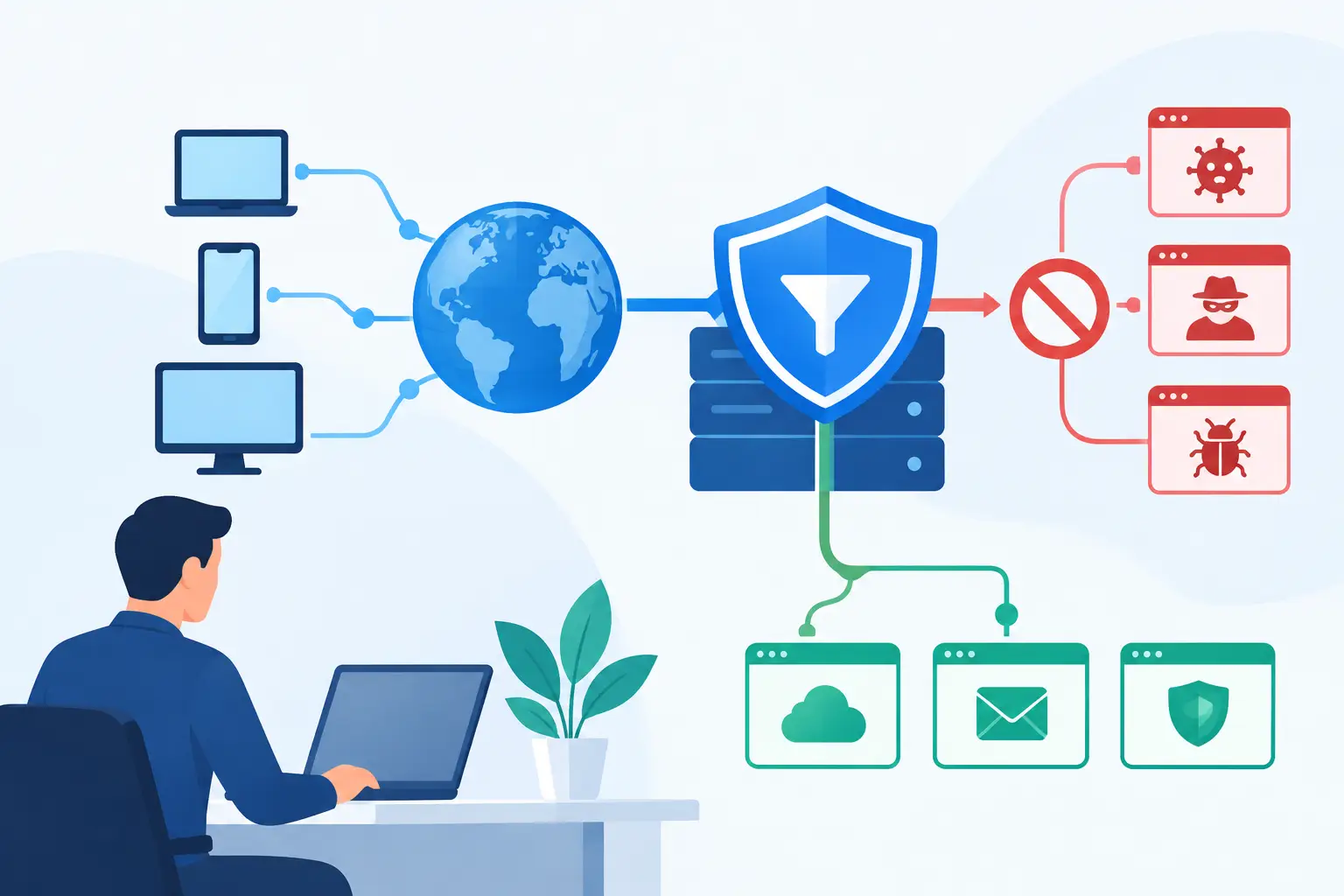
A single click on a convincing phishing link can turn an ordinary workday into a security incident. The link may arrive in an email, chat message, search result, or online ad – and it may look legitimate even to a careful employee. That is where DNS filtering provides an early, practical layer of protection.
What Is DNS Filtering?
DNS filtering is a cybersecurity control that evaluates requests to visit websites and blocks access to domains that are known to be malicious, inappropriate, or outside a company’s internet-use policy. It works at the Domain Name System, or DNS, level – the step that translates a website name such as `example.com` into the numerical address a device needs to reach it.
When an employee enters a web address or clicks a link, their computer sends a DNS request. A DNS filtering service checks that request against security intelligence and policy rules before returning an address. If the destination is associated with phishing, malware, command-and-control activity, or another blocked category, the service prevents the connection from moving forward.
For a business, that means a harmful site can be stopped before a browser loads it and before a malicious download, credential prompt, or infected page reaches the user.
Why DNS Filtering Matters for Small and Midsize Businesses
Cybercriminals do not limit their efforts to large enterprises. Small and midsize businesses are frequent targets because attackers know that internal IT resources can be limited and employees often rely on a mix of office, home, and mobile devices.
DNS filtering helps reduce exposure to common internet-based threats without requiring employees to identify every suspicious domain on their own. It can block a phishing page even when the message that delivered the link bypassed spam filtering. It can also prevent a compromised device from contacting a known malicious server after an infection attempt.
This protection matters because many attacks begin with ordinary web traffic. A fake Microsoft 365 sign-in page, a typo-squatted banking site, a fraudulent shipping notice, or a compromised vendor website can all use a domain name to direct a user somewhere harmful. Blocking the connection early creates an additional opportunity to protect credentials, financial information, and business data.
DNS filtering also supports productivity and policy enforcement. Organizations can restrict access to categories such as gambling, explicit content, illegal streaming, or high-risk file-sharing sites on company networks. The right policy should reflect the needs of the business rather than treating every employee or department the same. A marketing team may need social media access, for example, while a public kiosk or guest network may require far tighter limits.
How DNS Filtering Works in Practice
Every internet-connected device relies on DNS. Without it, users would need to remember long strings of numbers instead of familiar website names. DNS filtering inserts a security decision into this everyday process.
A managed DNS resolver receives a request from a device and compares the requested domain with threat feeds, reputation data, and the organization’s own rules. The service may allow the request, block it, or direct the user to a notification page that explains why access was denied. Administrators can review logs to see which requests were blocked, which devices generated them, and whether a pattern deserves attention.
A blocked request is often described as a DNS “sinkhole.” Rather than sending the device to the harmful destination, the filtering service provides a safe response or no response at all. The exact behavior depends on the platform and the policy configuration.
The process is fast, usually invisible to users, and broad in reach. When DNS settings are properly managed, protection can apply to workstations, laptops, phones, tablets, and other connected devices. It may protect people at the office, at home, or while traveling, depending on how the solution is deployed.
Security categories are only part of the picture
Threat intelligence is central to DNS filtering. Providers continually identify domains connected to malware distribution, phishing campaigns, botnets, ransomware infrastructure, cryptomining, and newly registered or suspicious websites. Policies can then block these destinations automatically.
However, category-based filtering requires judgment. A newly launched legitimate website may have little reputation history. A site used by one department may be unnecessary or distracting for another. Overly aggressive rules can interrupt legitimate work, while policies that are too permissive leave gaps. The best approach is to start with high-confidence security categories, monitor results, and refine access rules with business needs in mind.
What DNS Filtering Can and Cannot Do
DNS filtering is valuable because it addresses a common path into an attack, but it is not a complete cybersecurity program. It does not replace endpoint protection, multifactor authentication, email security, backups, patch management, employee awareness training, or a well-tested incident response plan.
For example, DNS filtering may stop access to a known phishing domain, but it cannot guarantee protection from every brand-new site or every attack hosted on a trusted platform. It also cannot inspect every action inside a website simply because the domain itself is allowed. A legitimate cloud storage service can be used for appropriate business activity or abused to share malicious files.
Encrypted web traffic adds another consideration. DNS filtering can determine whether a device should connect to a domain, but it generally does not inspect the full contents of encrypted traffic. Other security tools may be needed for deeper visibility, especially in regulated environments or organizations with elevated risk.
Employees can also attempt to bypass network DNS controls by using unauthorized encrypted DNS services, VPNs, or personal hotspots. A well-managed solution addresses this through endpoint policies, firewall configuration, user education, and clear acceptable-use expectations. The goal is not surveillance for its own sake. It is to reduce avoidable risk while allowing people to do their jobs effectively.
Where DNS Filtering Fits in a Business Security Strategy
Think of DNS filtering as a protective checkpoint near the front of the internet connection. It is particularly effective when paired with other layers that cover different points of failure.
Email security helps stop malicious messages before they reach inboxes. Multifactor authentication limits the damage when a password is stolen. Endpoint detection and response can identify suspicious activity on a computer. Automated backups help the business recover if an incident still succeeds. DNS filtering complements each of these controls by limiting connections to dangerous destinations in the first place.
It can also provide useful operational insight. Repeated blocks involving one device may indicate an employee is encountering risky content, a browser extension is behaving badly, or a machine is already compromised. Security logs are most helpful when someone reviews them, investigates meaningful alerts, and knows when to escalate an issue. A report that no one sees does not protect the business.
Choosing the Right DNS Filtering Approach
Businesses can deploy DNS filtering through a firewall, a cloud-based secure DNS provider, endpoint security software, or a managed security service. The right approach depends on where employees work, how many devices need coverage, whether the business has multiple locations, and how much internal IT capacity is available.
A firewall-based configuration can protect devices while they are connected to the office network. Cloud-managed DNS filtering can extend protection to remote laptops and users outside the office when an endpoint agent or managed profile is in place. Companies with hybrid workforces often need both network and device-level coverage rather than relying on a single office-based control.
Before deployment, decision-makers should identify who needs access to which business resources, how guest Wi-Fi should be handled, and how blocked-site exceptions will be requested and approved. They should also confirm that the system provides clear reporting, supports their existing network environment, and has someone accountable for monitoring policy changes and alerts.
The technical setup matters, but ongoing management matters more. Threat categories change, users change roles, devices are added and removed, and business requirements evolve. A DNS policy that worked a year ago may create unnecessary friction or miss newer risks today.
Turning a Blocked Website Into a Better Security Decision
When DNS filtering blocks a site, the immediate question should not always be, “How do we let this through?” First, determine why it was blocked. The domain may be part of an active phishing campaign, a site with a poor reputation, or a category that conflicts with company policy. If the business need is legitimate, an IT team can investigate the destination and make a deliberate exception rather than creating a permanent security gap.
This is where proactive technology support makes a difference. TechFusion helps businesses align security controls with day-to-day operations, so protective measures support productivity instead of becoming another unmanaged obstacle. The strongest DNS filtering program is one employees can rely on, leaders can understand, and IT teams continually tune as the business grows.
A safer internet experience does not depend on employees spotting every threat. It depends on putting smart, well-managed safeguards in place before an unsafe connection becomes a business disruption.